
Many homeowners and landscapers want their irrigation systems to work smarter. Hunter Rain-Clik Wireless Sensor System is a popular choice because it helps sprinklers stop when it rains. But one question often comes up: does this wireless rain sensor use batteries? This article explains how the Rain-Clik Wireless Sensor works, whether batteries are involved, and what that means for installation, maintenance, and performance. By the end, you’ll know exactly what powers this device and how it fits into your watering routine.
For a related topic, How Urbanization Threatens Communities And Landscapes Today gives readers a useful next step.
What Is The Hunter Rain-clik Wireless Sensor System?
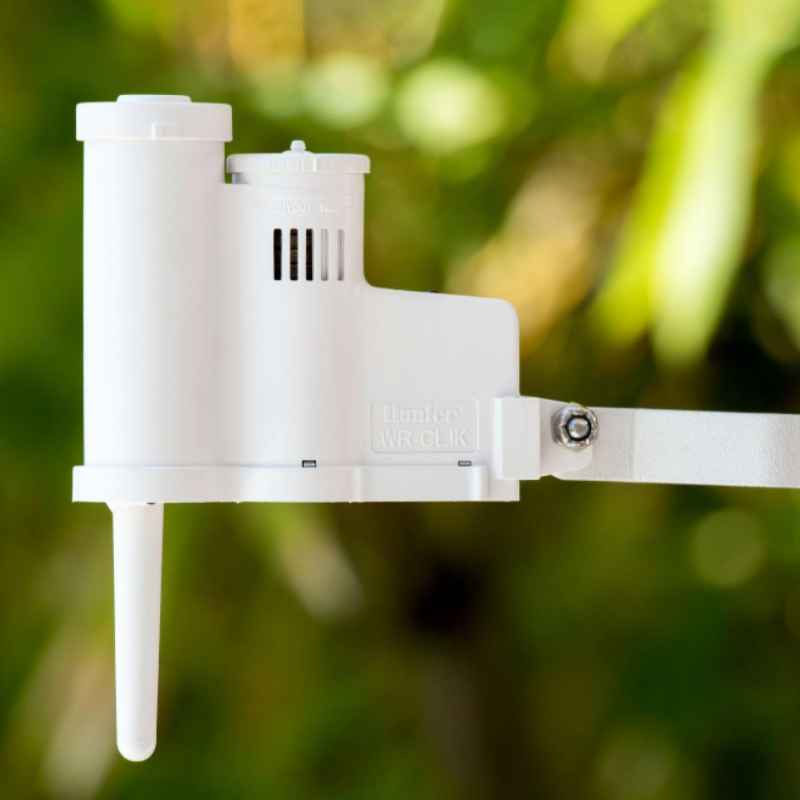
The Hunter Rain-Clik Wireless Sensor System is designed to help irrigation controllers “sense” rain and automatically pause watering. It uses a sensor placed outside, usually on the roof or fence, to detect rainfall. When it senses water, it sends a signal to your irrigation controller.
This stops the sprinklers from running during and after rain, saving water and preventing overwatering.
There are two main versions:
- Wired Rain-Clik: Connects directly to your controller with wires.
- Wireless Rain-Clik: Sends signals wirelessly, without any wires between the sensor and the controller.
The wireless version is popular for its easy installation and flexibility. You don’t need to run cables through walls or underground, making it ideal for both residential and commercial properties.
Does The Wireless Rain-clik Sensor Use Batteries?
This is the core question many buyers ask. Let’s break down the answer:
Yes, the Hunter Rain-Clik Wireless Sensor uses batteries. The sensor unit, which is placed outdoors, relies on batteries to power its wireless transmitter. The receiver unit, installed near the irrigation controller, is powered by the controller itself and does not need batteries.
Why Does The Sensor Use Batteries?
Wireless devices need a power source to send signals. Since the Rain-Clik sensor sits far from your main controller, it can’t use the same power supply. Batteries offer a practical solution:
- Easy installation: No need for electrical wiring.
- Reliable power: Batteries keep the sensor running even in remote locations.
- Low maintenance: The sensor uses very little power, so batteries last a long time.
What Type Of Batteries Does It Use?
The Hunter Wireless Rain-Clik sensor uses a single CR2032 lithium coin cell battery. This is a common battery used in watches and small electronics.
- Voltage: 3 volts
- Lifespan: Usually lasts 1–2 years in normal operation
- Replacement: Easy to find in stores, simple to change
The receiver unit does not use batteries. It connects to the irrigation controller and gets power from there.
How Does The Wireless Rain-clik System Work?
To understand why batteries are needed, it helps to know how the Rain-Clik system operates.
Sensor Function
The sensor unit sits outside, where it can detect rainfall. Inside, it has a Quick Response™ sensor that reacts to rain drops almost instantly. When rain hits, the sensor triggers a wireless signal.
Wireless Communication
The sensor sends the signal to the receiver unit, which is installed near your irrigation controller. The receiver reads the signal and tells the controller to pause watering.
- Range: Up to 300 feet (91 meters) line-of-sight
- Frequency: 433 MHz radio signal
- Reliability: The signal is stable and not easily blocked by walls or obstacles
Power Supply
- Sensor unit: Uses a CR2032 battery for wireless transmission
- Receiver unit: Gets power from the controller, no battery needed
This setup means you only need to check and replace the sensor battery occasionally.
Installation Process: Where Batteries Matter
Installing the Hunter Rain-Clik Wireless Sensor is simple, especially compared to wired systems. Here’s how batteries fit into the process:
Step-by-step Installation
- Mount the sensor unit: Place it outside, away from heavy shade, on a roof or fence. Make sure rain can reach it easily.
- Insert the battery: Open the sensor’s battery compartment and install the CR2032 battery.
- Pair sensor and receiver: Use the pairing button to sync the sensor with the receiver.
- Install the receiver unit: Connect it to the irrigation controller’s sensor terminals.
- Test the system: Simulate rain by pressing the test button or adding water to the sensor.
Tips For Battery Installation
- Make sure the battery contacts are clean and dry.
- Install the battery with the correct polarity (+/-).
- Keep a spare battery handy for quick replacement.
Battery Life During Installation
The sensor uses very little power except when sending a signal. During installation and testing, battery use is higher, but this is brief. After setup, battery drain slows down.
Maintenance: Monitoring Battery Health
Knowing the Rain-Clik sensor uses batteries means you need to plan for maintenance. Here’s what to expect:
How Often Should You Replace The Battery?
Most users report 1–2 years of battery life in normal conditions. However, weather, temperature, and how often it rains can affect battery lifespan.
- Cold climates: Battery life may be shorter
- Frequent rain: More signals sent, slightly faster battery drain
Signs Your Battery Is Low
- The sensor stops sending signals to the receiver
- The irrigation system waters during rain
- The sensor’s test button does not trigger the system
Checking And Replacing Batteries
- Check the sensor annually (before rainy season)
- Replace the battery if the sensor is slow or unresponsive
- Use fresh CR2032 batteries for best performance
Sensor Maintenance Tips
- Clean the sensor’s surface regularly
- Protect from extreme weather (hail, snow, debris)
- Check for corrosion in the battery compartment
Comparing Wired Vs Wireless Rain-clik Sensors
If you’re deciding between wired and wireless sensors, battery use is a key factor. Here’s a clear comparison:
| Feature | Wired Rain-Clik | Wireless Rain-Clik |
|---|---|---|
| Power Source | Controller power (no batteries) | CR2032 battery in sensor |
| Installation | Requires wiring | Wire-free, easier install |
| Maintenance | Little required | Battery replacement every 1–2 years |
| Flexibility | Limited by wire length | Sensor can be placed anywhere within range |
| Reliability | Consistent, no battery issues | Depends on battery health |
Wireless sensors are easier to install and more flexible, but require battery monitoring. Wired sensors need more effort upfront but almost no maintenance.
Advantages And Disadvantages Of Battery-powered Sensors
Is using batteries in the Rain-Clik sensor a good thing? Let’s look at the pros and cons.
Advantages
- Simple installation: No need for electrical wiring or digging.
- Flexible placement: Put the sensor anywhere rain falls, not just where wires reach.
- Quick setup: Install and pair in minutes.
- Low power usage: Batteries last a long time, reducing maintenance.
Disadvantages
- Battery replacement needed: You must check and change batteries every 1–2 years.
- Possible battery failure: If the battery dies, the sensor stops working and watering may continue during rain.
- Cold sensitivity: Lithium coin batteries lose power faster in cold weather.
- Environmental impact: Used batteries must be disposed of properly.
Real-world Performance: What Users Say
The Hunter Rain-Clik Wireless Sensor is widely used in homes, businesses, and schools. Reviews and user feedback show high satisfaction, but some mention battery issues.
- Positive feedback: Users like the easy installation and reliable rain detection. Most say the battery lasts over a year.
- Common complaints: A few report the sensor stopped working because they forgot to check the battery. Cold climates sometimes shorten battery life.
- Unexpected insights: Some users mount two sensors for larger properties. Others use solar-powered battery chargers to extend lifespan.
Example: Battery Replacement Experience
One homeowner in Seattle shared this story:
> “Our Rain-Clik stopped working last winter. I checked the battery and found it was dead after 18 months. Replacing the CR2032 took less than 2 minutes, and everything worked again. Now I set a reminder to check each year.
”
This simple routine can prevent watering during rain and save hundreds of gallons of water annually.
Battery Longevity: Factors Affecting Life Span
Not all batteries last the same amount of time. Here are key factors that affect the CR2032 battery in your Rain-Clik sensor:
- Temperature: Extreme heat or cold drains batteries faster.
- Rain frequency: More signals mean more power use.
- Battery quality: Cheap batteries may not last as long as branded ones.
- Sensor placement: Direct sun can heat the sensor and shorten battery life.
Data On Battery Life
Hunter’s official documentation suggests the battery will last at least one year under average conditions. Independent tests show some sensors run for nearly two years.
| Condition | Battery Life | Notes |
|---|---|---|
| Moderate climate, average rain | 18–24 months | Normal use, branded battery |
| Frequent heavy rain | 12–18 months | More signals sent |
| Cold winters | 10–14 months | Lower voltage in cold |
| Cheap battery | 6–10 months | May leak or fail sooner |
Environmental Impact Of Battery Use
Using batteries in outdoor sensors raises environmental questions. Here’s what you should know:
- Lithium coin batteries are small, but millions are used each year.
- Proper disposal is important. Batteries contain chemicals that can harm soil and water.
- Many cities offer battery recycling programs. Check your local options.
- Using branded, long-life batteries reduces waste over time.
Sustainability Tips
- Replace batteries only when needed, not before.
- Collect used batteries and recycle responsibly.
- Consider using rechargeable coin batteries if compatible.
Cost Comparison: Battery-powered Vs Wired Sensors
Let’s compare total costs over five years for both sensor types.
| Sensor Type | Initial Cost | Maintenance Cost | Total Cost (5 Years) |
|---|---|---|---|
| Wired Rain-Clik | $50–$70 | $0 (no batteries) | $50–$70 |
| Wireless Rain-Clik | $70–$90 | $8–$15 (4–5 batteries) | $78–$105 |
Wireless sensors cost more upfront and have ongoing battery expenses. However, the convenience may justify the price for many users.
Troubleshooting Battery Issues
If your wireless sensor isn’t working, battery failure is often the cause. Here are steps to solve common problems:
- Check the battery: Remove and inspect for leaks or corrosion.
- Test with new battery: Replace and see if the sensor works.
- Clean contacts: Use a dry cloth for any dirt or corrosion.
- Check pairing: Make sure sensor and receiver are synced.
- Inspect sensor location: Avoid places with extreme heat or cold.
If problems continue, contact Hunter support or review the manual.
Alternatives To Battery-powered Rain Sensors
If you want to avoid batteries altogether, you have options:
- Wired Rain-Clik Sensor: No batteries, powered by controller.
- Smart irrigation controllers: Some use Wi-Fi and weather data, no physical sensors needed.
- Solar-powered sensors: Rare, but some brands offer solar options.
Each method has pros and cons. Wired sensors are more reliable but harder to install. Smart controllers depend on internet access.
Practical Tips For Using Wireless Rain-clik Sensors
Here are some useful tips for getting the best performance from your battery-powered sensor:
- Set a reminder to check the battery every year.
- Use quality batteries for longer life.
- Mount in an open area for accurate rain detection.
- Protect from extreme weather but avoid blocking rain.
- Pair the sensor and receiver carefully, following instructions.
Non-obvious Insight 1
Many users don’t realize that weak batteries can cause false signals or missed rain events. If your sensor acts strangely, replace the battery even if it’s not fully dead.
Non-obvious Insight 2
The sensor’s CR2032 battery is sensitive to humidity inside the case. If you live in a damp climate, add a silica gel packet near the battery to reduce moisture and prevent corrosion.
Hunter Rain-clik Wireless Sensor System: Technical Specifications
Knowing the specs helps you plan battery use and maintenance.
- Wireless Range: Up to 300 feet (91 meters) line-of-sight
- Battery Type: CR2032 lithium coin cell
- Sensor Response Time: 1–2 minutes for rain detection
- Operating Temperature: 0°F to 140°F (-18°C to 60°C)
- Mounting Options: Roof, fence, wall, or gutter
- Receiver Power: 24V AC from irrigation controller
How The Battery Powers The Sensor’s Quick Response Feature
Hunter’s Quick Response™ technology is a standout feature. It lets the sensor react to rain in less than 2 minutes. The CR2032 battery powers this fast reaction by supplying steady voltage to the electronics.
- Fast trigger: Battery enables quick detection and signal transmission.
- Energy-efficient: Only uses power when sending signals, so battery lasts longer.
This balance between speed and battery life is a key reason Hunter uses coin cell batteries.
Safety Considerations When Handling Batteries
Always handle batteries with care. Here’s what you should do:
- Never mix old and new batteries
- Keep batteries away from children
- Store batteries in a cool, dry place
- Dispose of used batteries responsibly
Coin cell batteries can be dangerous if swallowed. If you have pets or young children, store extras safely.
Frequently Asked Questions
Does The Hunter Rain-clik Wireless Sensor Require Batteries For Both Sensor And Receiver?
No. Only the sensor unit uses a CR2032 battery. The receiver unit is powered directly by the irrigation controller and does not need a battery.
How Long Does The Battery In The Rain-clik Sensor Last?
The typical lifespan is 1–2 years, depending on climate, rain frequency, and battery quality. In colder climates, battery life may be shorter.
What Happens If The Battery In The Sensor Dies?
If the battery dies, the sensor stops sending signals. Your irrigation system may water during rain, and the sensor will not pause watering. Replace the battery promptly to restore function.
Can I Use Rechargeable Batteries In The Rain-clik Sensor?
Hunter recommends standard CR2032 lithium batteries. Some rechargeable coin cells may work, but often have lower voltage or shorter life. Always check compatibility before switching.
Is There An Indicator For Low Battery In The Rain-clik Sensor?
There is no built-in low battery indicator. Signs of low battery include the sensor failing to trigger during rain or the irrigation system running during wet conditions. Set a yearly reminder to check and replace the battery.
The Bottom Line: Does Hunter Rain-clik Wireless Sensor Use Batteries?
The answer is clear: the Hunter Rain-Clik Wireless Sensor System uses a CR2032 battery in its sensor unit. This battery powers wireless communication, making installation easy and placement flexible. The receiver unit does not use batteries, relying on the controller for power. While battery replacement is needed every 1–2 years, the system offers reliable rain detection and water savings for most users. By understanding how batteries affect performance, maintenance, and cost, you can choose the best sensor for your landscape and keep your irrigation system working efficiently.
For detailed technical information, visit the official Hunter website: Hunter Industries.