
Yes, Plant Parent is worth it for beginners who feel overwhelmed and need structured reminders for watering and care. It acts as a helpful digital assistant to build confidence. However, experienced gardeners or those on a budget may find its features unnecessary, as basic plant care can be learned for free.
Hello, fellow plant lovers! It’s Md Saiful Islam, your friendly gardening mentor. I often hear from new plant parents who feel a mix of excitement and worry. You bring home a beautiful new plant, but then the questions start. Am I watering it too much? Too little? Does it have enough light? It’s easy to feel lost.
Many of you have probably seen ads for apps like Plant Parent, which promise to solve all these problems. But with a subscription fee, the big question is: is it actually worth the money? You don’t want to pay for something you don’t need, but you also don’t want your new green friend to wither away.
Don’t worry, I’m here to help you figure it out. In this guide, we’ll break down exactly what the Plant Parent app does, who it’s for, and whether it’s the right choice for you. We’ll look at the good, the bad, and everything in between, so you can make a confident decision.
What Exactly Is the Plant Parent App?
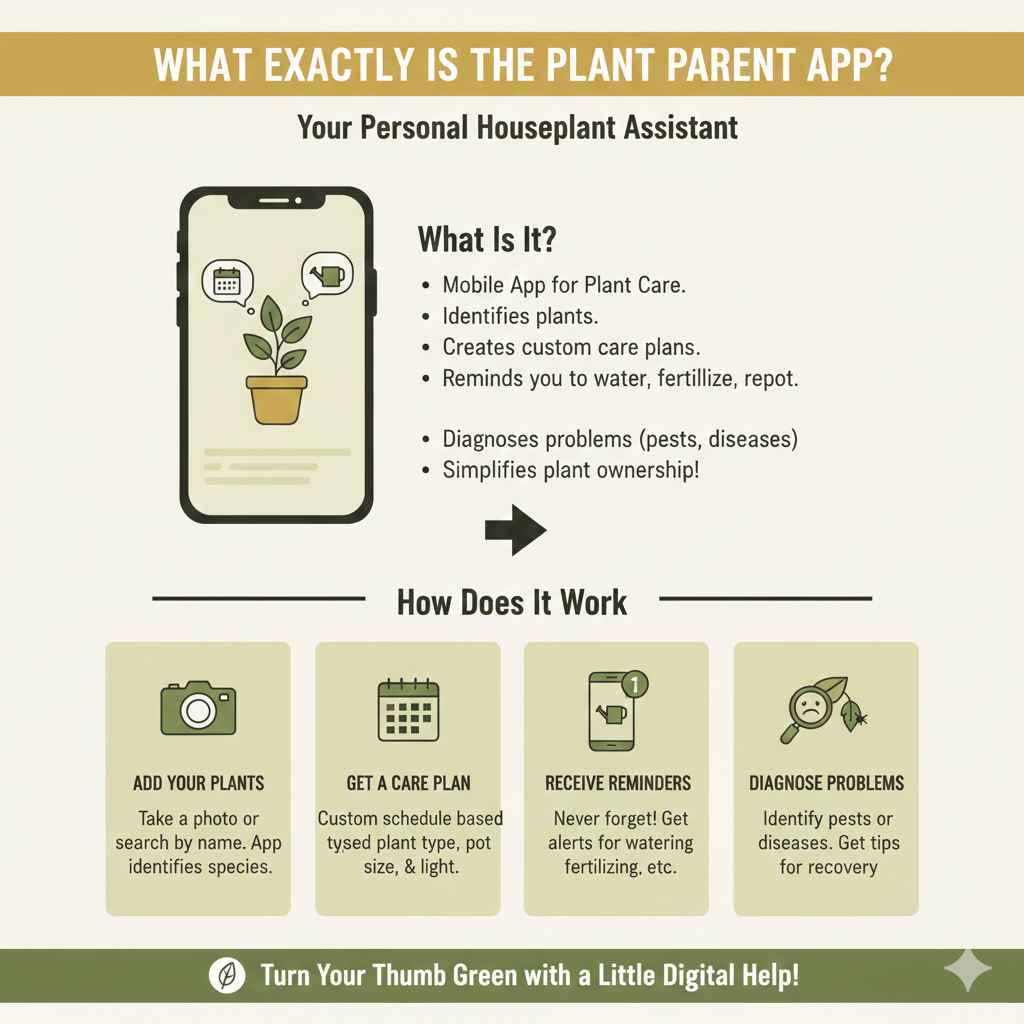
Think of Plant Parent as a personal assistant for your houseplants. It’s a mobile app designed to take the guesswork out of plant care. At its core, it helps you identify your plants, learn their specific needs, and reminds you when it’s time to care for them. Instead of trying to remember the unique watering schedule for your fiddle leaf fig, snake plant, and pothos, the app sends you a notification.
The main goal is to simplify plant ownership, especially for those who are just starting their journey. It combines several tools into one convenient package on your phone, aiming to turn your thumb green with a little digital help.
How Does It Work?
The process is usually very simple:
- You add your plants: You can take a photo of your plant, and the app’s identification feature will try to figure out what it is. You can also add plants manually if you already know their names.
- You get a care plan: Once the plant is identified, the app creates a customized care schedule based on the plant’s species, the size of its pot, and the light conditions in your home.
- You receive reminders: The app will send you push notifications on your phone when it’s time to water, fertilize, or repot your plant.
- You can diagnose problems: If your plant looks sick, you can use the app’s diagnostic tool to try and figure out what’s wrong, like pests or diseases.
It’s designed to be a one-stop-shop for managing your indoor garden, making care feel less like a chore and more like a simple, guided routine.
A Deep Dive into Plant Parent’s Key Features
To really understand if Plant Parent is worth it, we need to look closely at what it offers. While many apps have similar features, Plant Parent packages them in a user-friendly way. Let’s break down the main tools you’ll be using.
Plant Identification
This is often the first feature new users try. You snap a picture of an unknown plant, and the app uses image recognition technology to identify it. For beginners, this is incredibly helpful. Knowing whether you have a Calathea or a Maranta is the first step to providing proper care, as their needs are very different.
- Accuracy: The identification is generally quite good for common houseplants. However, it can sometimes struggle with rare species or if the photo isn’t clear.
- Benefit: It removes the initial barrier of not knowing what plant you have, which is a common problem for new enthusiasts.
Customized Care Schedules and Reminders
This is the heart and soul of the app. Once your plant is added, Plant Parent creates a schedule for watering, fertilizing, misting, and rotating. The reminders are the key to preventing the most common beginner mistakes: overwatering and underwatering.
- Watering Reminders: The app tells you exactly when to water. It even lets you “snooze” a reminder if the soil is still moist, which helps you learn to check your plants before watering—a crucial skill.
- Fertilizing Schedules: Feeding your plants is important for growth, but it’s easy to forget. The app reminds you during the growing season, helping your plants get the nutrients they need to thrive.
- Other Reminders: It also includes reminders for tasks like rotating your plant for even light exposure or misting humidity-loving plants.
Light Meter
One of the trickiest parts of plant care is figuring out light. What does “bright, indirect light” even mean? Plant Parent includes a light meter that uses your phone’s camera to measure the light intensity in a specific spot. You can walk around your home and find the perfect location for each of your plants based on their needs.
This is a fantastic tool for beginners who are still learning to read the light in their space. As the Penn State Extension notes, matching a plant to the correct light level is critical for its health.
Disease and Pest Diagnosis
When your plant’s leaves start turning yellow or brown, panic can set in. The Plant Parent app has a “plant doctor” feature where you can take a picture of the problem area. The app then tries to diagnose the issue, whether it’s a pest like spider mites or a disease like powdery mildew, and suggests treatment options.
While not a substitute for an expert, it can point you in the right direction and help you catch problems early before they become severe.
The Big Question: Free vs. Premium – Is the Cost Justified?
Plant Parent operates on a “freemium” model. You can download and use a basic version for free, but the most powerful features are locked behind a premium subscription. This is where the “is it worth it?” question really comes into play.
Let’s compare what you get with each version.
| Feature | Free Version | Premium Version |
|---|---|---|
| Add Plants | Limited (usually 3-5 plants) | Unlimited |
| Basic Watering Reminders | Yes | Yes |
| Plant Identification | Limited daily scans | Unlimited scans |
| Light Meter | No | Yes |
| Fertilizing & Misting Reminders | No | Yes |
| Disease Diagnosis | No | Yes |
| Expert Help Chat | No | Yes |
As you can see, the free version is more of a trial. It lets you test the basic reminder function with a few plants. If you have more than a handful of plants or want to use the more advanced tools like the light meter and disease diagnosis, you’ll need to pay for the premium subscription.
The cost of the premium version can vary, but it’s typically a weekly, monthly, or yearly subscription. When deciding if it’s worth it, consider the cost of replacing a plant. If a $30 per year subscription helps you keep a $50 Fiddle Leaf Fig alive, then the math works out in your favor. It’s an investment in your plant collection’s health and your own peace of mind.
The Pros and Cons of Using Plant Parent
No app is perfect. To make a balanced decision, let’s lay out the good and the not-so-good aspects of relying on an app like Plant Parent.
The Pros (What I Love)
- Builds Confidence: For absolute beginners, the app provides a safety net. It takes away the fear of doing something wrong and encourages you to get started.
- Excellent for Busy People: If you have a hectic schedule or are naturally forgetful, the reminders are a lifesaver. It keeps your plants on a consistent schedule even when your life isn’t.
- All-in-One Convenience: It combines a plant identifier, a light meter, a care calendar, and a diagnostic tool into a single app. You don’t need to juggle multiple resources.
- Helps Manage Large Collections: If you have dozens of plants, it’s nearly impossible to remember the specific needs and last watering day for each one. The app automates this, making it manageable.
- Encourages Learning: By identifying a plant and providing its care needs, the app teaches you about what your plant requires to thrive.
The Cons (What to Be Aware Of)
- The Cost: The biggest drawback is the subscription fee. There are many free resources online (like blogs, YouTube channels, and forums) that can teach you the same things.
- Can Create Over-Reliance: Relying solely on the app might prevent you from developing your own “plant intuition.” Learning to read your plants—by checking soil moisture with your finger or observing the leaves—is the most valuable skill a gardener can have.
- Schedules Can Be Inflexible: The app’s schedule is based on an algorithm. It doesn’t know if you had a cloudy week or if the heater was running, which can affect how quickly the soil dries. You still need to use your own judgment.
- Inaccurate Identifications or Diagnoses: The technology isn’t foolproof. It can misidentify a plant or give a wrong diagnosis, which could lead to incorrect care. Always try to double-check with another source if you’re unsure.
- Pushy Notifications: Some users find the reminders and upsell notifications for the premium version to be aggressive or annoying.
Who Is Plant Parent Perfect For?
After weighing the pros and cons, it becomes clear that the app is a fantastic tool for a specific type of plant owner.
- The Absolute Beginner: If you’ve never owned a plant before and feel completely lost, Plant Parent is a wonderful starting point. It holds your hand through the basics until you feel more comfortable.
- The Forgetful Plant Owner: If you love plants but can’t seem to remember to water them, the reminders are worth the price of admission.
- The Collector with Many Plants: For those with a large and diverse indoor jungle, the app is an organizational powerhouse that keeps everything straight.
- The Gifter: If you’ve received a plant as a gift and have no idea what it is or how to care for it, the identification feature is a game-changer.
Who Should Probably Skip It?
On the other hand, Plant Parent isn’t a necessary expense for everyone.
- The Experienced Gardener: If you’ve been caring for plants for years, you likely have already developed the skills the app teaches. You know how to check soil and identify common problems on your own.
- The Budget-Conscious Hobbyist: If you’re on a tight budget, the subscription fee is an ongoing cost that can be avoided. You can find all the information you need for free online or in library books.
- The Hands-On Learner: If you enjoy the process of learning through research, trial, and error, you might find the app gets in the way of your natural learning process.
- The Minimalist: If you only have one or two easy-care plants (like a snake plant or ZZ plant), you really don’t need a sophisticated app to manage them.
Are There Good Alternatives to Plant Parent?
Yes, absolutely! The plant app market is growing, and there are several other great options to consider. Some are direct competitors, while others are free tools that can accomplish similar tasks.
| Alternative | What It’s Good For | Cost Model |
|---|---|---|
| Planta | Often considered the top competitor. Very detailed care schedules and a slick interface. Great for serious hobbyists. | Freemium (subscription for full features) |
| PictureThis | Primarily known for its highly accurate plant and disease identification. Many consider it the best for this specific feature. | Freemium (subscription for full features) |
| Google Lens | A free and surprisingly effective tool for plant identification. It’s built into many Android phones and available as a standalone app. | Free |
| Your Phone’s Calendar/Reminders | Once you know your plant’s needs, you can set up recurring watering reminders for free. It’s a simple, no-frills solution. | Free |
| Gardening Blogs & YouTube | Following trusted gardening mentors (like yours truly!) provides expert advice, visual guides, and a sense of community for free. | Free |
My Final Verdict: A Helpful Tool, Not a Magic Bullet
So, after all this, what’s my final take as your gardening mentor? Plant Parent is a valuable tool, but it is not an essential one.
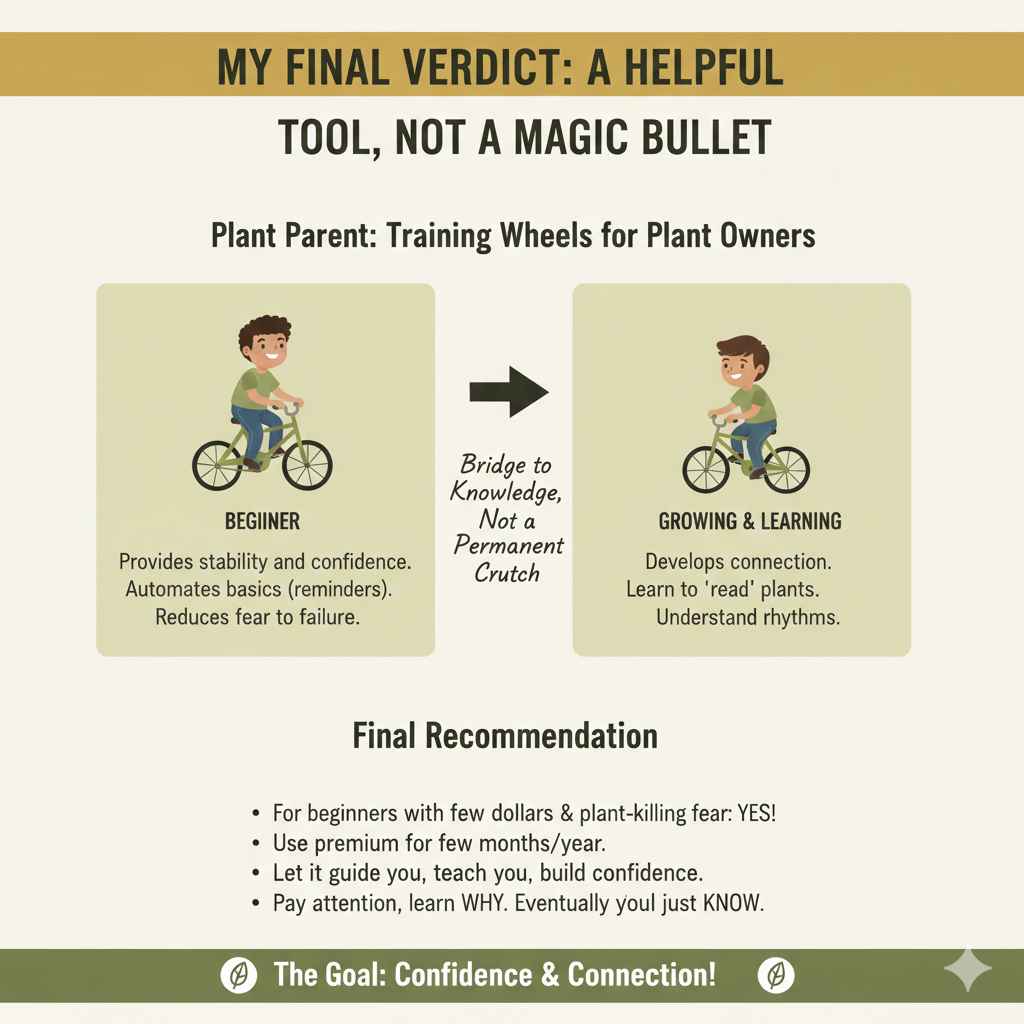
I see it like training wheels on a bicycle. When you’re first learning to ride, training wheels provide the stability and confidence you need to get going without falling. They help you understand the basic mechanics. Plant Parent does the same for new plant owners. It automates the basics so you can enjoy the ride without the initial fear of failure.
However, the ultimate goal is to eventually take the training wheels off. The real joy of gardening comes from developing a connection with your plants—learning to read their leaves, feeling the soil, and understanding their rhythms. The app should be a bridge to that knowledge, not a permanent crutch.
If you’re a beginner with a few dollars to spare and a real fear of killing your new plants, I say go for it. Use the premium version for a few months or a year. Let it guide you, teach you, and build your confidence. But as you use it, pay attention. Learn why it’s telling you to water. Notice how the light changes in your home. Eventually, you’ll find you don’t need the reminders anymore. You’ll just know.
Frequently Asked Questions (FAQ)
1. Is the Plant Parent app free to use?
The app has a free version, but it is very limited. You can typically only add a small number of plants and use basic watering reminders. Most of the helpful features, like the light meter, unlimited identifications, and detailed care schedules, require a paid premium subscription.
2. How accurate is the plant identification feature?
It’s generally quite accurate for common houseplants, especially with a clear, well-lit photo. However, it can sometimes struggle with rare varieties, young plants, or similar-looking species. It’s a great starting point, but if you get an unusual result, it’s always a good idea to cross-reference the ID with a Google search.
3. Can I use Plant Parent for my outdoor garden plants?
The app is primarily designed and optimized for indoor houseplants. While you can technically add outdoor plants and try to set reminders, its recommendations for watering and light won’t account for complex outdoor factors like rainfall, humidity, wind, and seasonal changes. It’s best used for your indoor collection.
4. Will the app tell me exactly how much water to use?
No, and this is an important distinction. The app will remind you when to water, but it won’t tell you how much water to give. The proper technique is to water thoroughly until it drains from the bottom of the pot, and then empty the saucer. The app helps with timing, but you still need to learn proper watering technique.
5. What is the main difference between Plant Parent and Planta?
Both are top-tier plant care apps, but they have slightly different strengths. Plant Parent is often praised for its user-friendly interface and solid all-around features. Planta is sometimes considered more detailed and scientific in its recommendations, offering features like a “drip” watering setting. The best choice often comes down to personal preference, so it can be worthwhile to try the free version of both.
6. Does using the Plant Parent app guarantee my plants will survive?
Unfortunately, no. It greatly increases your chances of success by eliminating common mistakes like forgetting to water. However, it can’t account for everything, such as a plant that arrived with root rot, a sudden pest infestation, or extreme temperature changes in your home. It’s a guide, not a guarantee.
7. Is the subscription billed weekly, monthly, or yearly?
Plant Parent typically offers several subscription options, including weekly, monthly, and an annual plan. The annual plan almost always offers the best value, providing a significant discount compared to paying weekly or monthly. Be sure to check the pricing in the app store before you commit.
Conclusion: Grow With Confidence, With or Without an App
Deciding whether Plant Parent is worth it comes down to knowing yourself and your needs. If you’re a new plant owner looking for a structured, confidence-building start, the app can be an excellent investment. It simplifies complex care routines into easy-to-follow steps, allowing you to enjoy the beauty of your plants without the stress.
However, if you’re an experienced gardener or someone who enjoys the process of hands-on learning, you can absolutely achieve the same results for free. The most important tools in gardening will always be your eyes, your hands, and your curiosity.
Whether you choose to use an app or go the traditional route, remember that the goal is the same: to create a healthy, thriving green space that brings you joy. Don’t be afraid to make mistakes—every single gardener has killed a plant or two! It’s all part of the journey. Happy planting!